Running it
Everything runs from the repository root with npm. The Preprod runbook is the full procedure. This page is the short version and the story of the live runs.
What you need
- Node.js 22 or newer.
- A Blockfrost project for Preprod. The free plan is enough.
- A new 32-byte operator key:
openssl rand -hex 32. - About 300 test ADA from the Preprod faucet for that key.
- At least 10 tUSDM for the
userrole. Use the Masumi test USDM unit shown below.
CAUTION: use a new key. Never put the key of a real wallet into this project.
Build and test
npm ci                     # every tool, including Aiken and the circuit compiler
npm run build:circuits     # compiles the three circuits
npm run setup:dev          # development proving keys, about 30 minutes the first time
npm test                   # 1,019 TypeScript tests across the workspaces
npm run check:contracts    # 354 Aiken tests with real proofs as fixtures
npm run typecheck
The TypeScript tests include a local test chain in packages/txlib/src/testing/ that evaluates every transaction with the live cost models, so a transaction that passes there passes on Preprod. npm test -w ops plays the whole product against that local chain: deploy, node, seller and demo, in about a minute.
Deploy a pool
Set POOL_ASSET in .env to select the asset for ops:deploy. Unset means ADA.
For the M0 tUSDM pool on Preprod, use:
POOL_ASSET=16a55b2a349361ff88c03788f93e1e966e5d689605d044fef722ddde.0014df10745553444dtUSDM has 6 decimals. The limits stay at 5,000,000, 50,000,000 and 500,000,000 base units: 5, 50 and 500 tUSDM. The validators stay unchanged, and an ADA pool remains supported. A new asset parameter gives the token pool a new pool ID.
The repository holds the record of the zx402 pool deployed on 2026-10-07, which holds tUSDM, pool ID 60279ebfb8db22bbe0cb2a1b7a61702ab36ade074a3866ac836df3ed. To use it you need its proving keys, which are not in the repository. To deploy your own, move that record away first.
The circuits do not depend on the asset, so the existing proving keys stay valid when only the asset changes.
- Copy
.env.exampleto.env. - Set
NETWORK=preprod,BLOCKFROST_PROJECT_IDandOPERATOR_SEED_HEX. - Print the addresses and the cost:
npm run ops:deploy -- --dry-run - Fund the
operatoraddress from the faucet. - Make the network proving keys:
npm run ops:setup - Deploy:
npm run ops:deploy
CAUTION: .env holds a signing key and the Blockfrost project ID. Git ignores it. Never commit it or paste it anywhere.
CAUTION: back up circuits/build/keys-preprod/ after step 5. No setup can make the same keys twice. Without them, nobody can insert, pay or exit, and the notes in the pool stay locked.
Step 6 sends four transactions and writes deployments/preprod.json.
The earlier ADA deployment took about 3.5 minutes and cost about 245 test ADA.
Of that, 160 went to the role keys and 73.6 stayed in the four reference script outputs.
Use the dry run to check the current deployment cost.
Deployment funds the role keys with ADA only. Send at least 10 tUSDM to the user address printed in step 3.
Keep ADA there too, because token deposits and exits need minimum ADA and network fees from that wallet.
The ADA pool from 2026-10-06 is retired, and its record moved to deployments/retired/.
Keep that record, its proving keys and its note stores. The retirement procedure explains how to sweep its reference outputs.
Run the node, the seller and the demo
Set the seller’s environment to the pool’s exact asset and a price of 2 tUSDM:
export SELLER_PRICE_ASSET=16a55b2a349361ff88c03788f93e1e966e5d689605d044fef722ddde.0014df10745553444d
export SELLER_PRICE_AMOUNT=2000000
The x402 package’s default Preprod USDM policy starts with e675b46e. It is not the pool’s tUSDM asset.
The demo selects an offer in the pool’s exact unit and includes it in allowedAssets.
For an ADA pool, use SELLER_PRICE_ASSET=lovelace and keep the price amount in lovelace.
Start one command in each of three terminals. Use the seller settings in the second terminal.
npm run node -w ops                                              # indexer on 4010, relayer on 4011
SELLER_ADDRESS=<address> npm run seller -w examples/x402-seller  # stock x402 seller on 4021, 2 tUSDM per forecast
npm run demo -w ops                                              # the whole story
The demo deposits 10 tUSDM, then waits for the insert and approval. It asks the seller for the weather, gets a 402, and pays through the stock x402 client with the SDK’s signer. It prints the forecast and every transaction hash, then exits the change in public. The user pays 2 tUSDM for the weather and a 1 tUSDM relayer fee, leaving 7 tUSDM to exit with M0’s zero protocol fee. The fee is per payout because the relayer supplies 2 ADA for each payout output by default. Leg 2 pays the seller the tokens and all attached ADA minus its fee. It has no change output.
The deposit wallet supplies about 1.4 ADA for the deposit output plus its network fee. The crank keeps that ADA and takes no tokens. The exit wallet also supplies minimum ADA for its output.
The demo keeps its notes in deployments/<network>/demo-store-<first 8 hex of the pool ID>.json.
Each pool gets its own store, so the demo cannot load the retired pool’s notes into the new pool.
Keep that file. Without it, the SDK finds old deposits and takes new secrets, but unspent change notes remain out of reach.
A staged demo in three minutes
The deposit wait is the slow part, and it can be done before an audience arrives. Two flags cut the live part to one payment:
npm run demo -w ops -- --no-exit   # before the demo: deposit, pay, and leave the 7 tUSDM change in the pool
npm run demo -w ops -- --reuse     # live: pay from that change note, no deposit, then exit
--reuse pays from the largest spendable note in the store instead of depositing. --no-exit leaves the change in the pool. On Preprod the live part took 71 seconds to the seller’s HTTP 200 and about 35 more for the exit.
Paying a Masumi agent
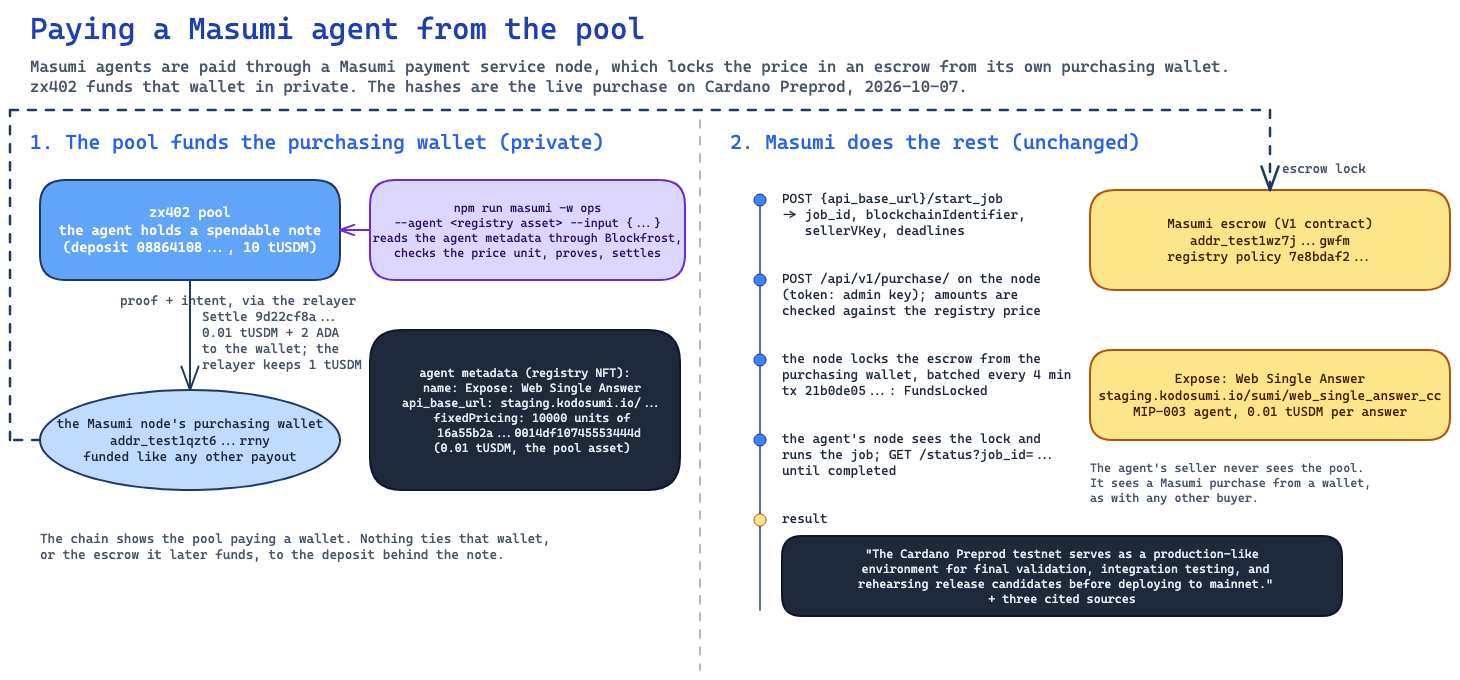
Masumi agents on Preprod are paid through a Masumi payment service node, which locks the price in Masumi’s escrow contract from its own purchasing wallet. The pool can fund that wallet in private:
MASUMI_API_KEY=<admin key of your Masumi node> MASUMI_PURCHASE_WALLET=<its purchasing wallet address> \
npm run masumi -w ops -- --agent <registry asset of the agent> --input '{"question":"..."}'
The command reads the agent’s registry metadata through Blockfrost, refuses an agent that is not priced in the pool’s tUSDM unit, pays the purchasing wallet with one private Settle, starts the job, creates the purchase on your Masumi node, waits for the escrow lock, prints the result and the explorer links. Add --deposit to start with a fresh 10 tUSDM deposit, for an end-to-end demo; without it the command deposits only when no note in the pool covers the price. MASUMI_NODE_URL defaults to http://localhost:3001. The measurements record the live purchases.
Admin actions
npm run admin -w ops -- status prints the pool balance, the tree size, the queue, the approved count and the fees. The same command can pause and resume deposits, change the limits, collect fees and wind the pool down. Every admin action needs the admin threshold of signatures and stays inside the hard bounds of the config validator.
The live runs
The retired ADA pool on Preprod was deployed on 2026-10-06. The demo ran six times against it, and all six ended with HTTP 200 and the forecast. The table below records those ADA runs. The tUSDM pool of 2026-10-07 and the zx402 pool that replaced it the same day each had one run, both HTTP 200: 372 and 351 seconds for the whole demo, 76 and 71 seconds for the payment.
| Run | What was special | Payment, in seconds | Whole demo |
|---|---|---|---|
| 1 to 4 | The same note store each time | 69 to 116 | 206 to 396 |
| 5 | Started without the store file, with the same seed. The SDK found the four old deposits on chain and took fresh secrets. Before the fix in PR 58 it would have reused a secret and locked the deposit | 83 | 311 |
| 6 | The final code with all five fixes from the comparison with Base. Preprod made no block for 132 seconds in the middle | 178 | 338 |
The life of a payment page follows run 6 transaction by transaction. The full tables are in the measurements.
Provider quota
Every read of the chain is a request to Blockfrost, and the free plan allows 50,000 a day. An idle node uses about 1,100 to 1,600 requests an hour, so 27,000 to 39,000 a day, and one demo run adds 150 to 200 in the node. That fits the free plan with room for some dozens of demo runs. A longer round with ZX402_INTERVAL_MS spends fewer requests and makes payments slower. A busy pool needs a paid plan or an own chain backend.
If something goes wrong
- The deploy stops midway. Nothing is lost. Fix the cause and run the deploy again with
-- --force. - The demo stops after the pool paid the one-time address. The error names the index of the one-time key. The funds sit at that address until
recoverOneTimeFunds({ index, payTo })moves them. - The relayer answers
queue_full. The pool queue holds 8 change notes. Wait for the crank, which inserts up to 4 per block. - The relayer answers
stale_asp_root. The approved set changed. Prove again with the new root. - The node logs
Chain tip changed during syncorPool history has not reached the current pool UTXO. Normal. The next round succeeds. - A payment waits for minutes. Preprod sometimes makes no block for a minute or more. Every service waits for confirmed data before each step.
Section 9 of the runbook has the full list.
Mainnet
The code accepts NETWORK=mainnet and the mainnet canary runbook describes a small pool with the team’s own funds. Nothing is deployed on mainnet yet. Read Trust and limits first: a pool whose proving keys one party made, and whose start state the chain does not check, must never take outside deposits.